Have you ever wondered how scientists look at proteins or DNA? Here’s the secret- they don’t actually look at physical molecules all that often! Frequently, they use softwares like PyMOL. PyMOL is a widely used molecular visualization program that converts structural data into detailed 3D models, allowing scientists to rotate, zoom, and explore molecules interactively. It was originally developed by Warren Lyford DeLano and has become a standard tool in structural biology and chemistry (DeLano, 2002).
PyMOL works by reading files that contain the exact positions of atoms in three-dimensional space, often obtained from experimental techniques like X-ray crystallography and stored in databases such as the Protein Data Bank. Using this coordinate data, the program reconstructs molecules and displays them in different visual styles, including sticks, spheres, and ribbon diagrams that highlight protein folding patterns. These visualization approaches are essential for understanding how molecular structure relates to function and are widely used in both research and education (Sehnal et al., 2021).
What makes PyMOL especially powerful is how interactive and customizable it is. Scientists can highlight specific regions of a molecule, measure distances between atoms, and even model how molecules might interact with each other- something that is especially important in drug design and biochemistry. Because it translates complex data into intuitive visuals, PyMOL helps bridge the gap between abstract molecular concepts and real-world understanding, making it a valuable tool not just for scientists, but also for students learning about the molecular world.
References:
DeLano, W. L. (2002). PyMOL: An open-source molecular graphics tool. San Carlos, CA: DeLano Scientific. Available at http://www.pymol.org
Sehnal, D., Bittrich, S., Deshpande, M., Svobodová Vařeková, R., Berka, K., Bazgier, V., Velankar, S., Burley, S. K., Koča, J., & Rose, A. S. (2021). Mol* Viewer: Modern web app for 3D visualization and analysis of large biomolecular structures. Nucleic Acids Research, 49(W1), W431–W437. https://doi.org/10.1093/nar/gkab314
Berman, H. M., Westbrook, J., Feng, Z., Gilliland, G., Bhat, T. N., Weissig, H., Shindyalov, I. N., & Bourne, P. E. (2000). The Protein Data Bank. Nucleic Acids Research, 28(1), 235–242. https://doi.org/10.1093/nar/28.1.235
Recently, I’ve had the opportunity to visit a friend up north and experience my first ever hackathon, hosted by none other than MIT. Every year, undergraduate students from all over the world gather to Cambridge to attend this student-run event. The goal of a hackathon is to get as far as possible in realizing an innovative project that aligns with an overall theme. For HackMIT, we had 24 hours to design a tech-based project focused one of four areas: sustainability, education, health and accessibility, and interactive media. In working on my project, I developed my coding skills a bit while getting to witness firsthand what life is like for both a CS major and an MIT student.
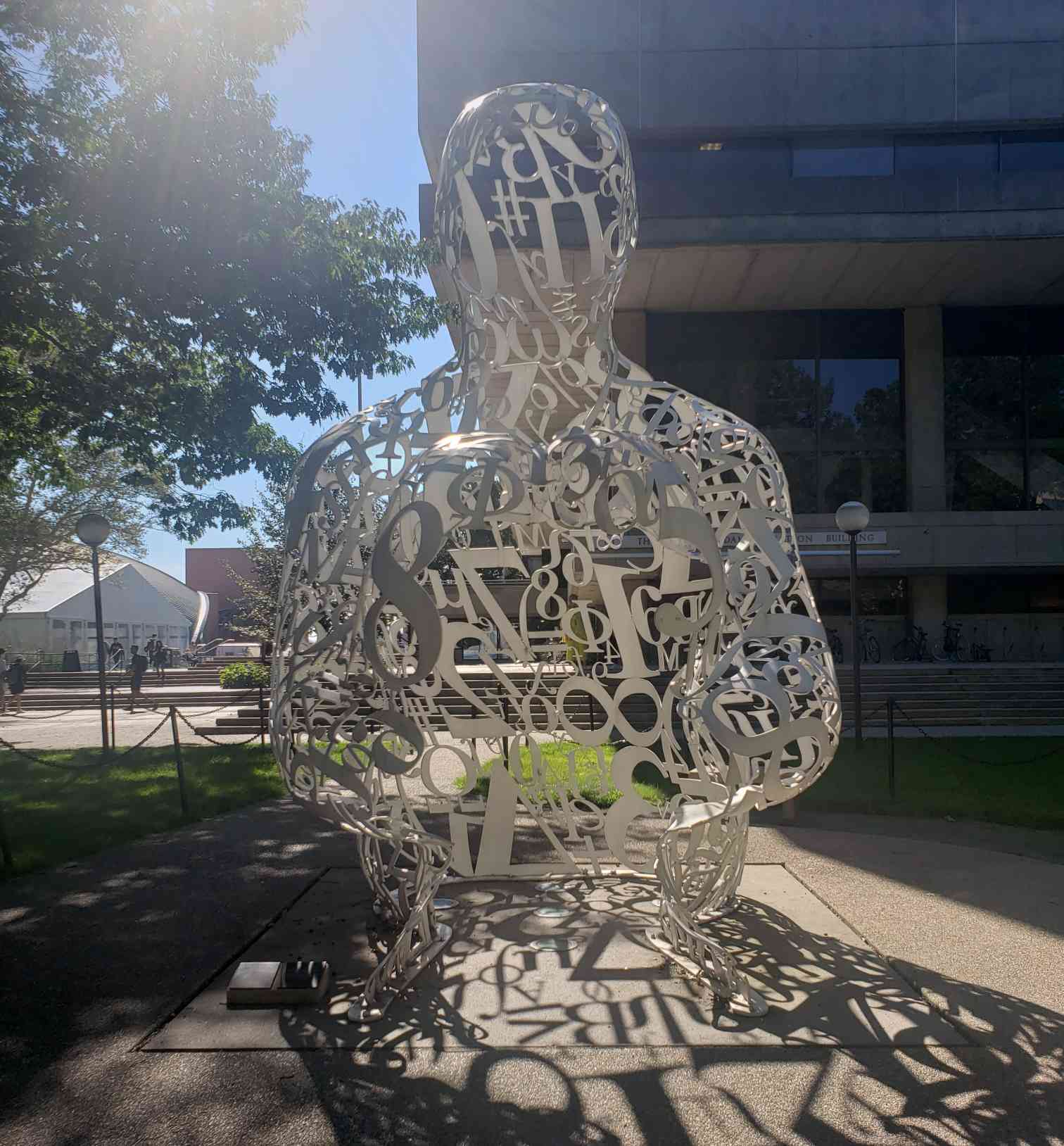
This piece is called Alchemy, and it was my favorite statue at MIT
The Opening Ceremony
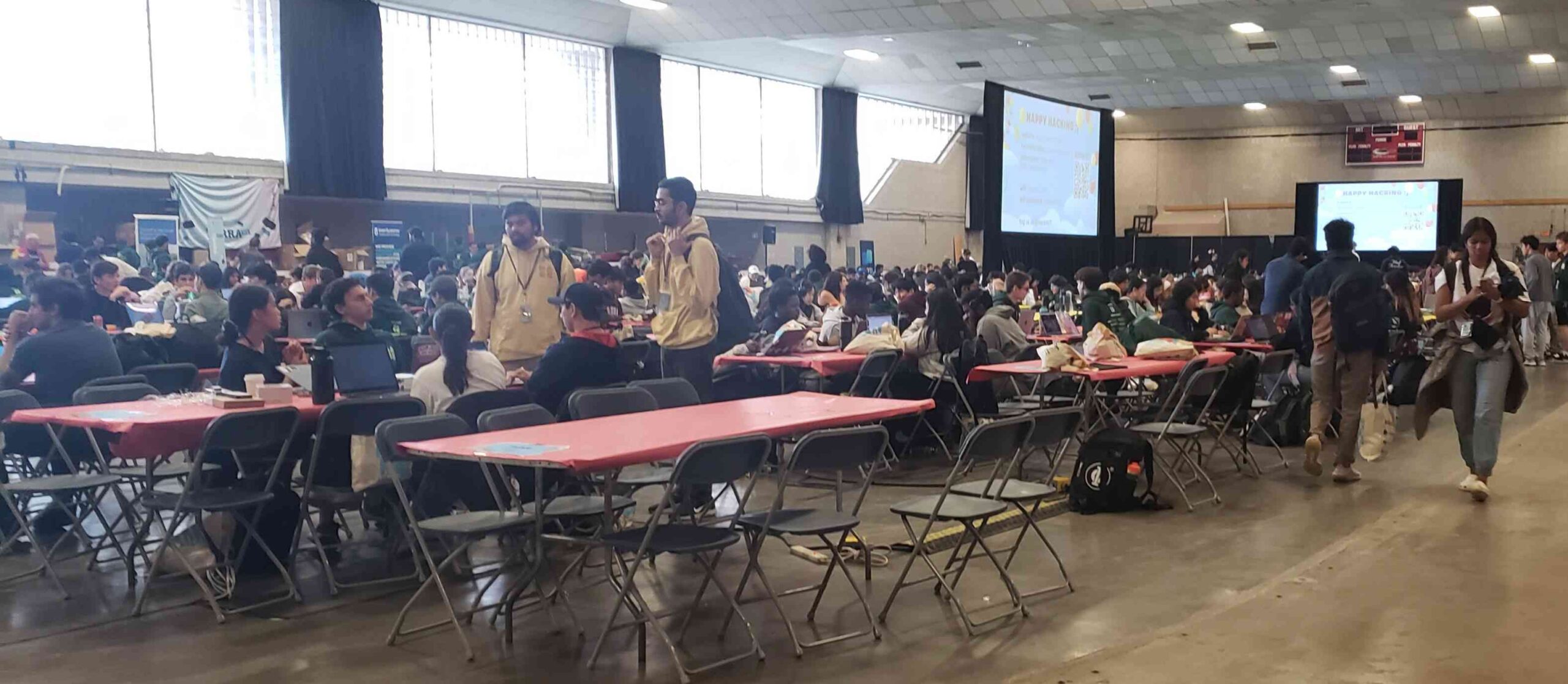
On the day of the competition, we all gathered in a huge gymnasium for the opening ceremony. I was immediately blown away by the sheer number of competitors lining the bleachers in preparation for the our guest speaker, Ali Partovi, to kickoff the hackathon.
Endless tables of competitors planning out their course of action for the next 24 hours.
When the ceremony finally began, we were introduced to all the sponsors, and at this point, I gained my first piece of insight into the computer science community. All of the sponsors at the event appeared to be tech-based companies, with some of them, including Partovi, being representatives of mentorship programs designed to facilitate the innovation process for aspiring computer scientists. This along with sponsors ranging from cryptocurrency to health technology painted a picture for me of a community that fostered ambition in achieving goals teetering between wealth and altruism.
After the sponsors were introduced, Partovi began his speech, which was, interestingly enough, one of the highlights of my time in Cambridge. Apparently an avid Matrix fan, Partovi attempted to kick off his talk by sharing several scenes and quotes from The Matrix, but he was met with technical difficulties, resulting in a few awkward yet entertaining minutes of Partovi adamantly trying to resolve the issues and share with us the masterpiece that is the 1999 original version of The Matrix. Eventually, he succeeded and we were rewarded with a geeky adoration of the classic film, with Partovi confessing that he even named his mentorship company Neo after the movie’s main character. Partovi highlights a conversation between two characters in the film that discusses the idea of not having to “dodge bullets.” And from this, he segues into his main discussion.
The rest of the speech was centered around Partovi’s experience in the tech industry and about not being afraid of failure, which he calls “bullets.” Though outside of that primary purpose, there were some questionable decisions in his talk. He began by discussing a time when he failed to close a deal with Steve Jobs because he acted dishonestly, which appeared to be a valuable lesson on its own, but he then followed this discussion with a time he lost out on a deal for being too honest. I will leave it to the reader to decide the moral of this story. Afterwards, Partovi took the opportunity to promote his mentorship program Neo and in the process make a comment that later sparked a feud with another mentorship program sponsoring the event.
The Project
After the ceremony, my team took a moment to explore the MIT grounds before beginning our project. Within the gymnasium itself, there were sponsors hosting independent coding challenges and offering freebies. I recognized this as a so-called “networking opportunity” that I always hear CS majors talking about. There were also various workshops, including one on how to work with Hugging Face AI models, which was interesting, and one on how to mint NFT’s, which was less interesting.
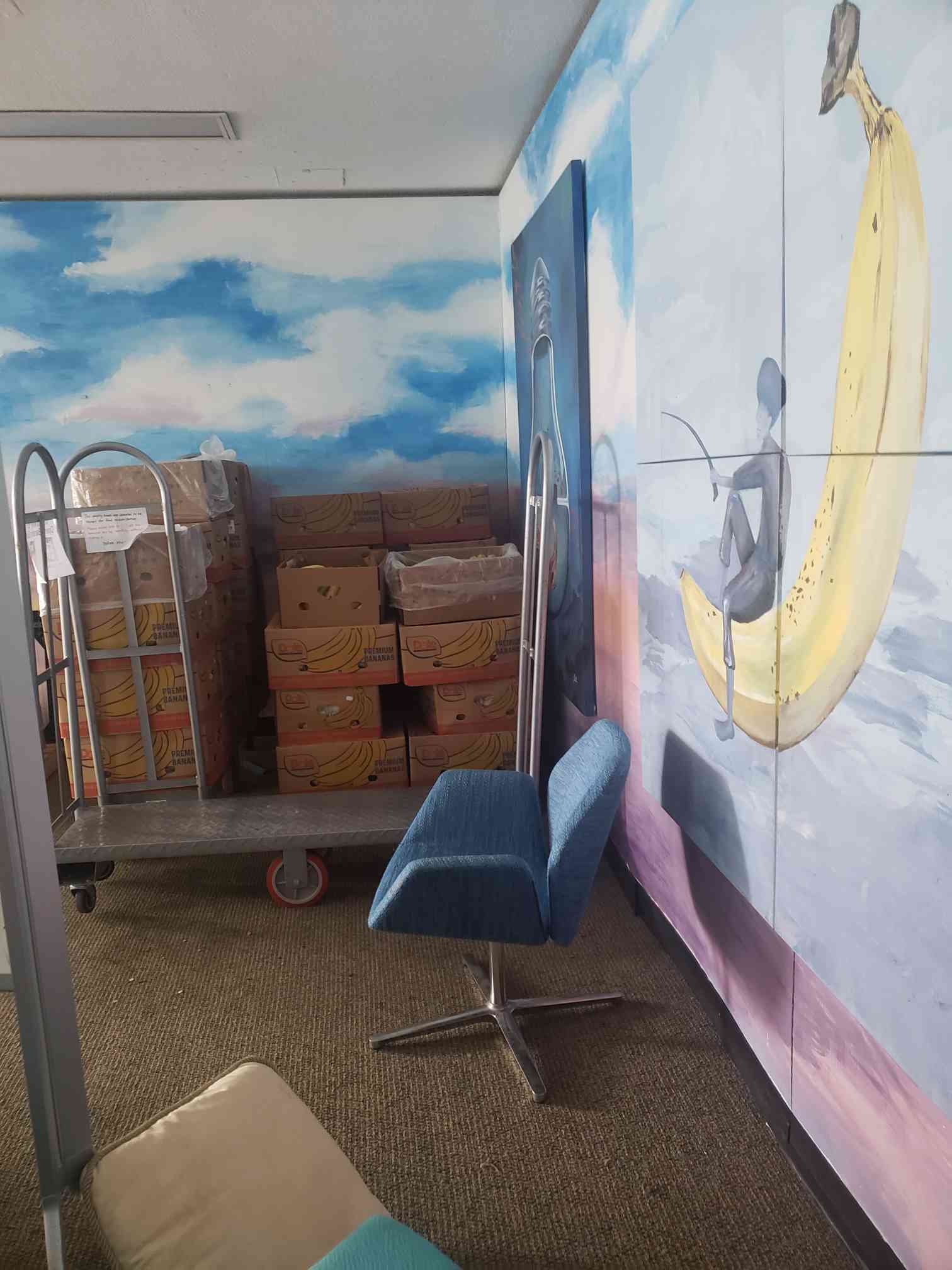
Although many groups stayed in the gym, we decided to leave and find a more quiet place on campus to work instead. Our journey led us all throughout MIT, which had a very interesting layout. The entire campus was a vast network of buildings and hallways with an interconnected basement system. One hallway in Building 17 can lead you to Building 22. It was as if the entire school were its own small indoor city. This was not what I expected when I heard the rumor that MIT students don’t go outside. Eventually, our journey led us to the MIT banana room, a room that provides students with an endless supply of bananas as they slave away on their homework assignments or prepare for their next exam. We sat down on some brightly colored bean bags amidst a wall of banana paintings and got to work.
The banana crates in MIT’s banana room, providing much needed potassium to the students of MIT.
We chose to work in the interactive media category. Our initial goal was to design a game using a large language model. The premise of the game involves two parties, guessers and pretenders. The guessers would have to choose a prompt for the pretenders to answer, but among the pretenders is an AI that will also respond to the prompt. The goal of the guessers is deduce which response was AI generated, while the pretenders’ goal is to fool the guessers into choosing incorrectly. In challenging the guessers to distinguish an AI from real people, the game highlights how far AI has come in mimicking human speech and thought. On the other hand, pretenders are challenged to “act like an AI” in the sense of thinking on their feet and producing a seeming clear and cogent response according to various prompts.
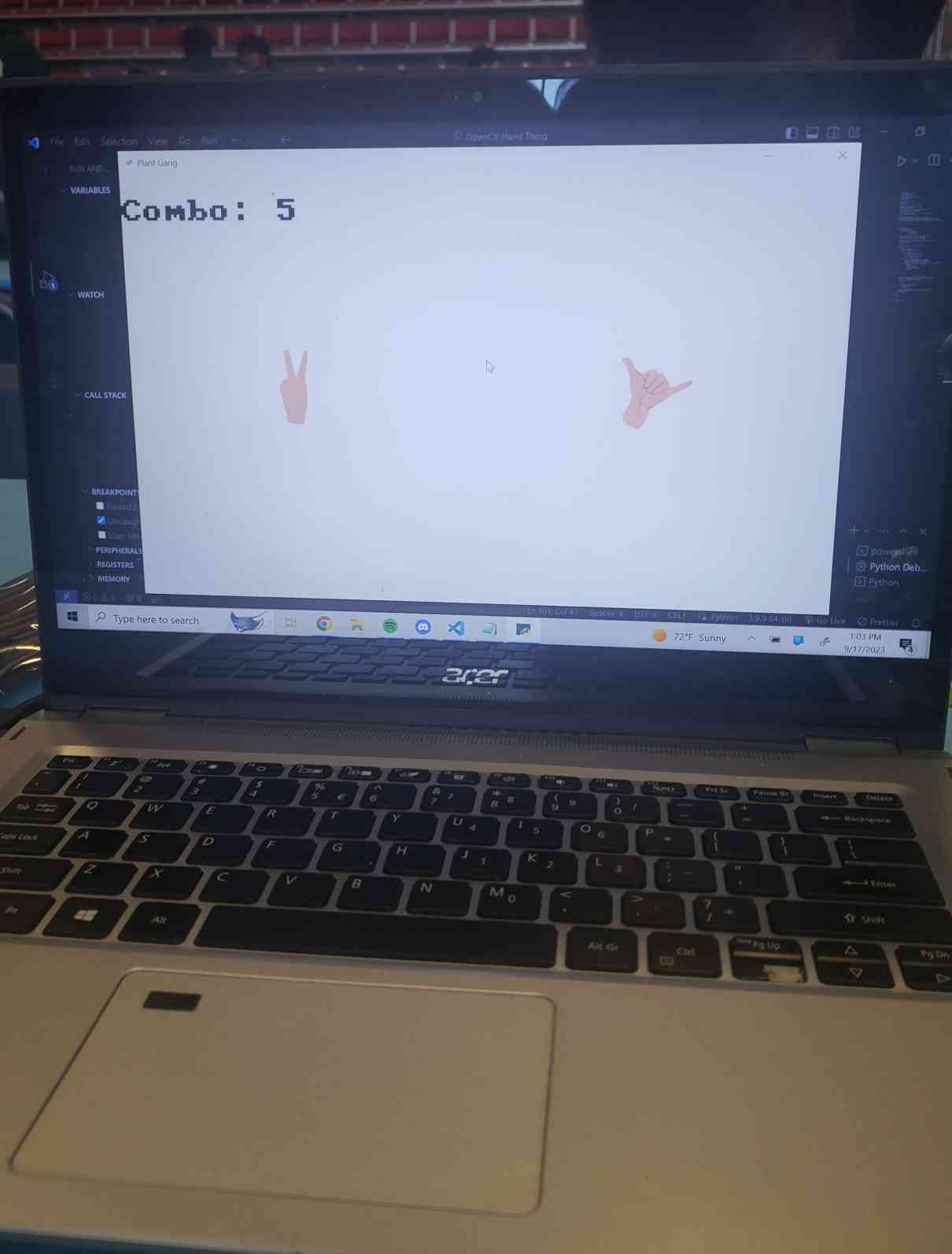
Unfortunately, late into our project, we realized that we were too ambitious and would not be able to create a presentable program in time, so we decided to scrap the project in favor of a rhythm game involving hand gestures, aptly titled Hands Dance Revolution. By feeding data of different hand poses to a convolutional neural network, we were able to train the network to identify when those poses were being made on camera. We then used the Pygames library to create a basic game that kept a count of how many times the hand gestures were correctly matched in a given time limit. This game was a basic proof of concept of our actual idea, which would have been a game similar to a hybrid if Just Dance and Dance Dance Revolution in which hands would be positioned and posed to the beat of a song to score points.
The Conclusion
The creation of this project required several new skills. Although I had experience in Python with data science, using Python to make games was entirely new to me. My friend spent hours watching countless tutorials on convolutional neural networks. It was not until 6 in the morning that I went to bed for an hour, shortly before it was time to turn in our project. When the moment of truth came, we did not make as much progress as we had wanted, but we at least had a presentable project for the judges.
The fruits of our labor, the interface of our project. It’s not much, but it’s honest work.
After the window for projects closed, we had about an hour to prepare for our presentation on our project. During that time, we spoke with other teams, one of which had a project that I particularly liked. They designed an web extension that used an large language model trained on lecture transcripts in order to answer questions for students watching the lecture and redirect them to the appropriate timestamp in which relevant information is discussed.
When it was time to present our project, I spoke enthusiastically about our game idea and the next steps for our program. However, the judges did not seem too interested in the video game angle. It was not until one of my group members improvised and discussed the potential that our project had in helping people learn sign language or recover motor functions that the judges began to get excited. What I had not realized was that it was not just the project that the judges were assessing but us and our ability to sell our project. Throughout the presenting period, we were given advice by the judges on how we could better market our project and make it seem more appealing to potential investors. Once again, I was reminded that CS majors were very externally motivated and ambitious people.
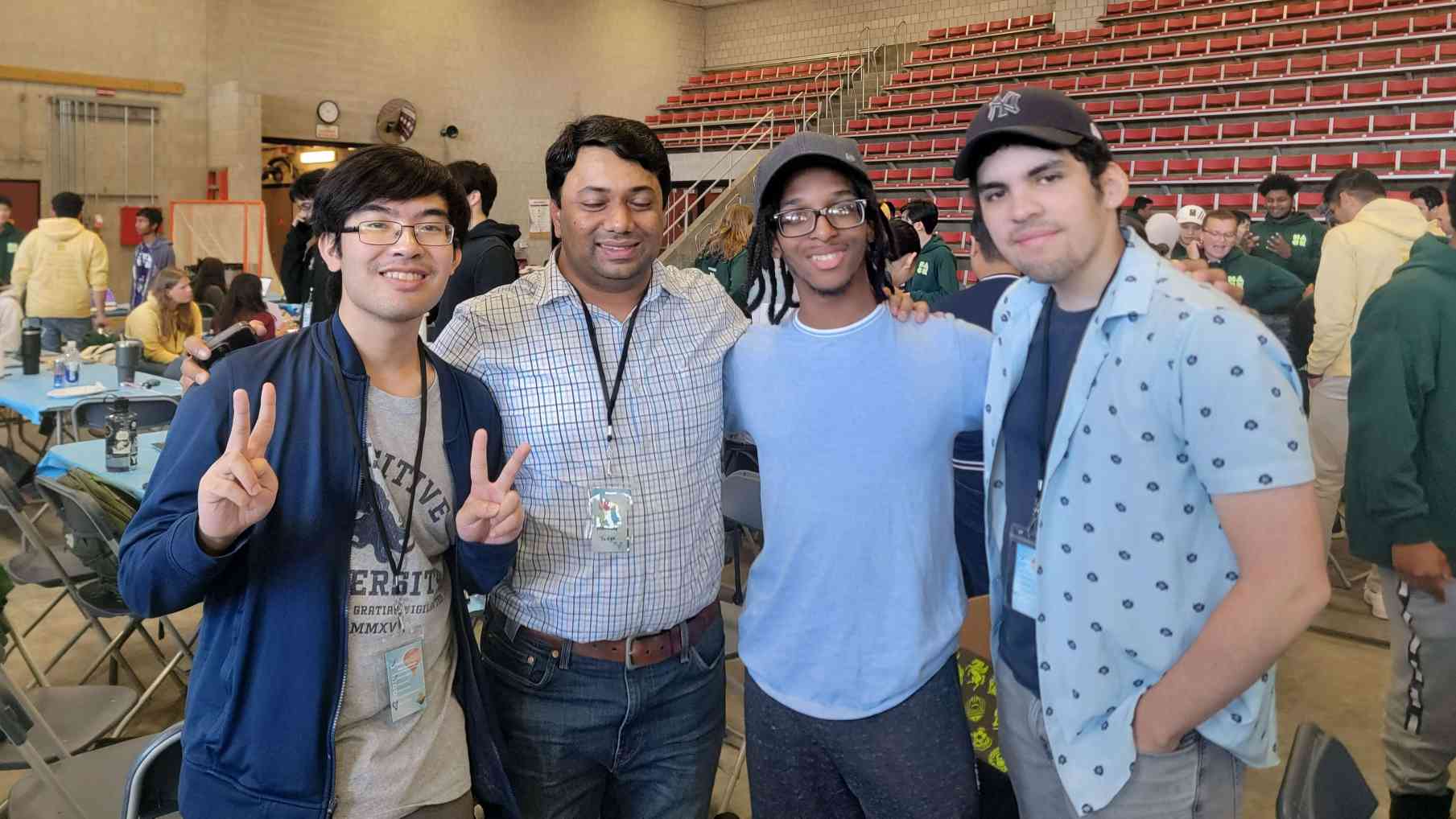
A picture of my team with one of the judges. We turned something in, and that is all that matters.
Unfortunately, we did not make it to the second round of presentations, but this experience is something that I will never forget. Overall, I had fun seeing the sights in Cambridge and immersing myself in something new, but as a physics major interested in becoming a researching professor, I could not match the energy of most of the other competitors, who were more interested in working for big companies and creating startups. However, because of my different interests, the stress of the project was not as bad for me as it seemed for many other people. As an avid seeker of new experiences, I would definitely recommend doing most things at least once. But in particular, attending HackMIT or another hackathon appears to be an excellent way of deciding if the atmosphere of the computer science world is right for you.
Have you ever wondered how your computer works? Who decided that we should use keyboards to tell our devices what to do? And who else later decided that touch screens were cooler much of the time. Much of how we think about computing we currently owe to John von Neumann, who developed the current way of thinking about computers.
The Von Neumann architecture is a model that was developed in the 1940s by John von Neumann, a physicist and mathematician, who was an early computer researcher. During World War 2, cracking secret codes and the development of nuclear weapons led to an increase in public funding for computer research, as machines could do lots of arithmetic quickly and accurately. Von Neumann would go on to outline a model for building any sort of computer in his The First Draft Report on the EDVAC (the EDVAC being a computer he was working on at the time) that has been the standard for all computing devices since.
In his model, von Neumann illustrates that a computer should have several main components:
Arithmetic Unit
Control Unit
Memory
Input
Output
Flexibility of the Model
This model is relatively flexible – in his paper, von Neumann mentions that different machines could very well have different capabilities while still being built with all of these components in mind. Computers that use the von Neumann architecture range from very simple (such as the one in your microwave) to the massive supercomputers that have dedicated buildings. The wide scope of computers that fall under the von Neumann model are proof that von Neumann achieved his goal when it came to creating a model that was versatile.
Components and What They Do
The control unit, as described by von Neumann, is the part of the computer that keeps track of what is supposed to run when. When you turned on your computer, your PC’s control device (most probably inside of a CPU) queued up the correct start up operations. The purpose of the control unit is to allow a computer to run many different kinds of programs, and switch between them when necessary. While this seems trivial now, the first computers were manually operated. If you wanted a computer to do something different than what it was previously doing, you had to go in and change all of the wires yourself. The conception of a control unit allowed the computer to modify its own hardware and software, allowing a great deal of abstraction for users. Computers being able to modify themselves (and other computers) essentially enables modern computing as we know it, the good (high level programming languages, not swapping about the wires in your desktop) and the bad (it would be impossible to hack a pre-von Neumann computer without performing an elaborate heist operation to change around the wiring yourself).
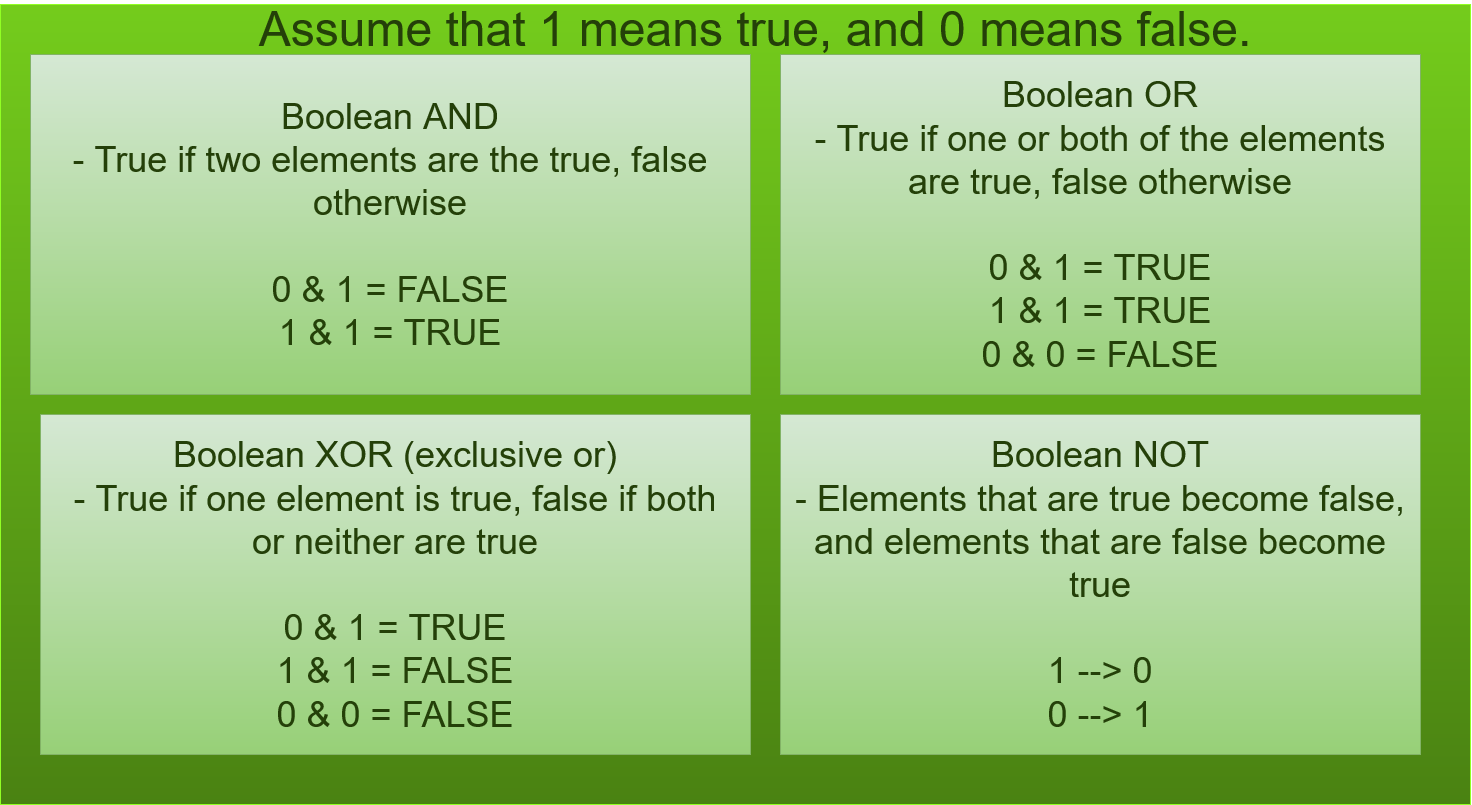
The arithmetic unit of a computer does the logical processing. Computers were originally designed for doing lots and lots of math, so von Neumann designated an entire component of his model to do that. Despite being called the arithmetic unit, this unit is also responsible for doing logical operations as well. Arithmetic units allow computers to distinguish if two sequences of binary are completely the same (an AND operation), if some of the numbers are the same, or allowing sign flippage.
The memory component of this model is probably simplest to understand. If we want computers to do work in a useful capacity, they need to be able to remember what we’ve done. Most modern computers have two types of memory. They’ve got long term, slower memory, which is usually kept in the hard drive. Computers also have faster, short term memory. This is typically stored in RAM. Traditionally, RAM memory has been volatile. This means that it is erased when you turn the power off. This is also why you used to lose everything you did on older video games without saving – if you didn’t tell the computer to move your data out of RAM and onto the hard drive, it was just lost.
The last components of a computer are its input and output components. Input is just how the user puts instructions into a computer. These days, inputs are most often keyboards and/or touch screens, although speakers are becoming more common. Output is how a computer communicates what it’s doing to the user. Most computers have a visual (a screen) and an audio (speakers and/or headphones) component to the output.
Conclusion
The von Neumann model for computing has lasted for nearly a century. Pretty much any device that you use will have been built and designed with the von Neumann architecture in mind. That being said, scientists are looking beyond this model for the future. Quantum computing and other innovations may mean we say good bye to the von Neumann architecture.
Freiberger, P., & Swaine, M. (2016, November 14). Von Neumann machine. Retrieved September 15, 2020, from https://www.britannica.com/technology/von-Neumann-machine
von Neumann, J. (1945). First draft of a report on the EDVAC. doi:10.5479/sil.538961.39088011475779
In computer science, there are many ways to organize data to be used effectively. These many ways are called Data Structures. Of the many data structures, there are data structures that are hierarchical in which the data is organized into a tree-like structure. A specific tree data structure that will be taught is a Binary Search Tree.
In order to learn draw a Binary Search Tree, one must be able to learn the basic things that will help understand.
A binary search tree is similar to a family tree in a way. Before we begin, lets learn about the different terms that will be useful in understanding.
Node – a single place where data is.
Children – the data linked and below another piece of data
Root – the highest point of data
Leaf – the data at the ends
The nodes, root, leaf nodes, and children in a BST
Now that you know the basics, lets learn specific topics that help understand the different forms of a tree.
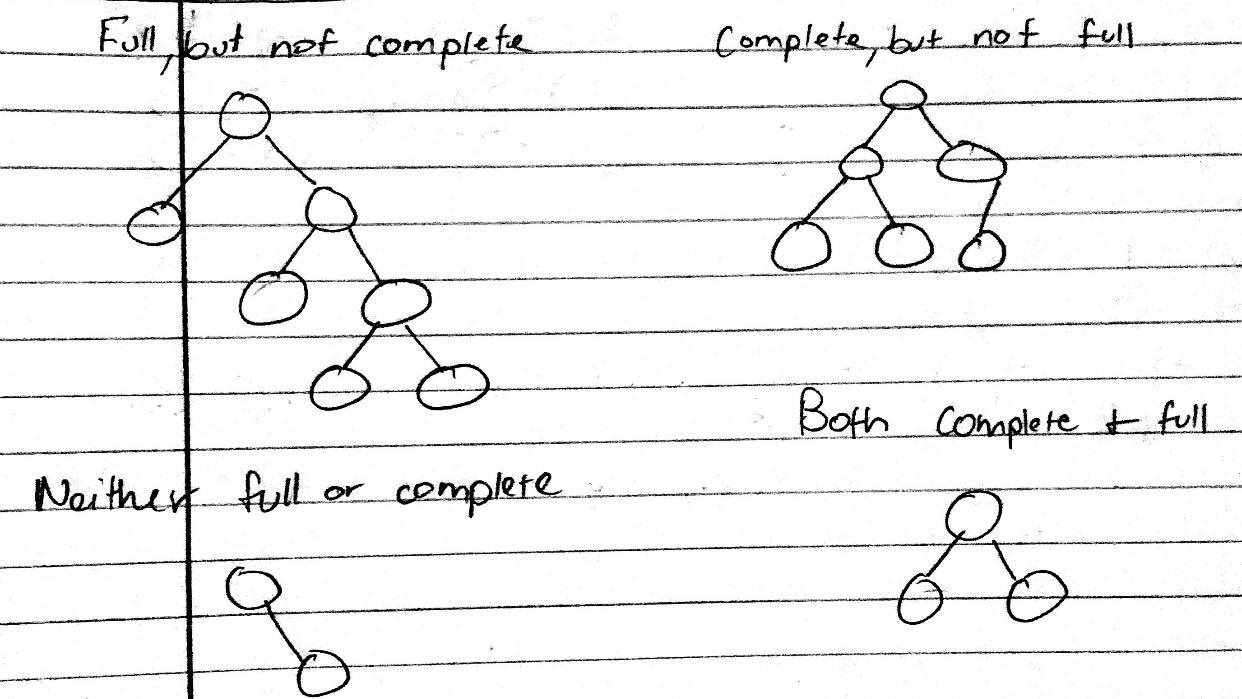
Full –every node
other than the leaves has two children
Complete – every level, except possibly the last, is completely filled, and all nodes are as far left as possible
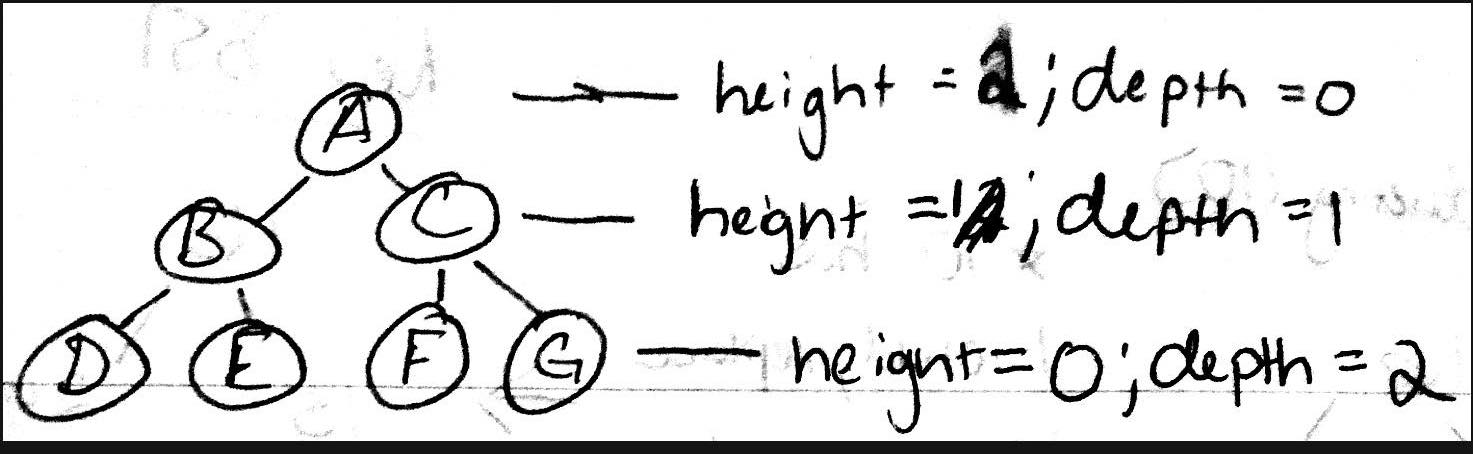
Height- the longest path from the root node to a leaf node
Depth – number of edges from the specific node from the root node
These are different forms of a tree.
This shows the height and depth of a tree
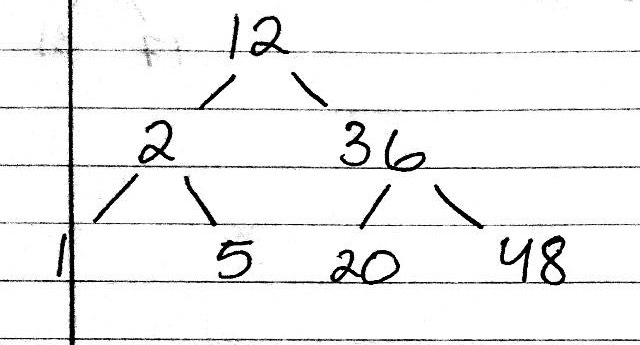
A binary search tree is a binary tree in which the nodes have a value that is greater than all values in its left subtree and smaller than all values in its right subtree.
This is how a BST looks like
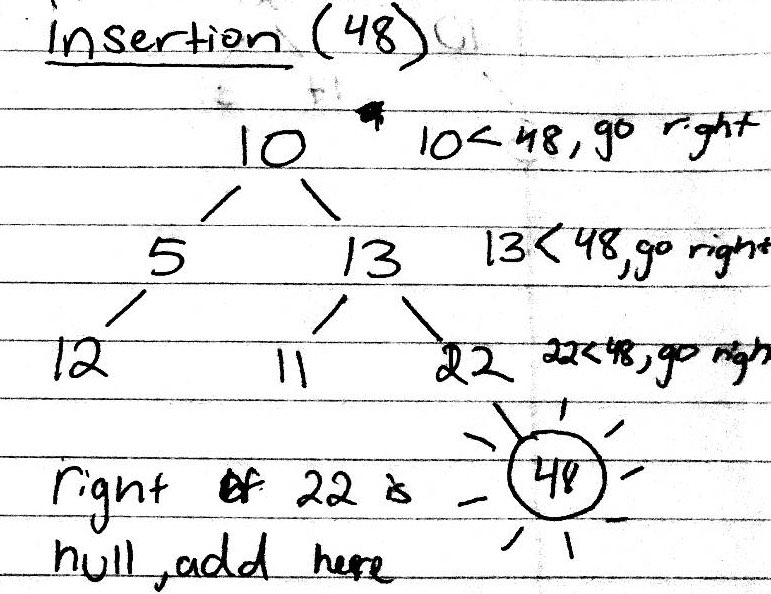
In order to insert to a BST, you start from the root of the tree and check if the value is greater than or less than that value and if it is greater than the value, then you go to the right and check again if it is greater than or less than the value and so on and so forth until you get to the end where you add that value to the tree.
This is how to insert data into a BST
Deleting a node in BST
When deleting a node within a BST, there are many considerations to check for. The first thing to check is to see if the specific node has any children.
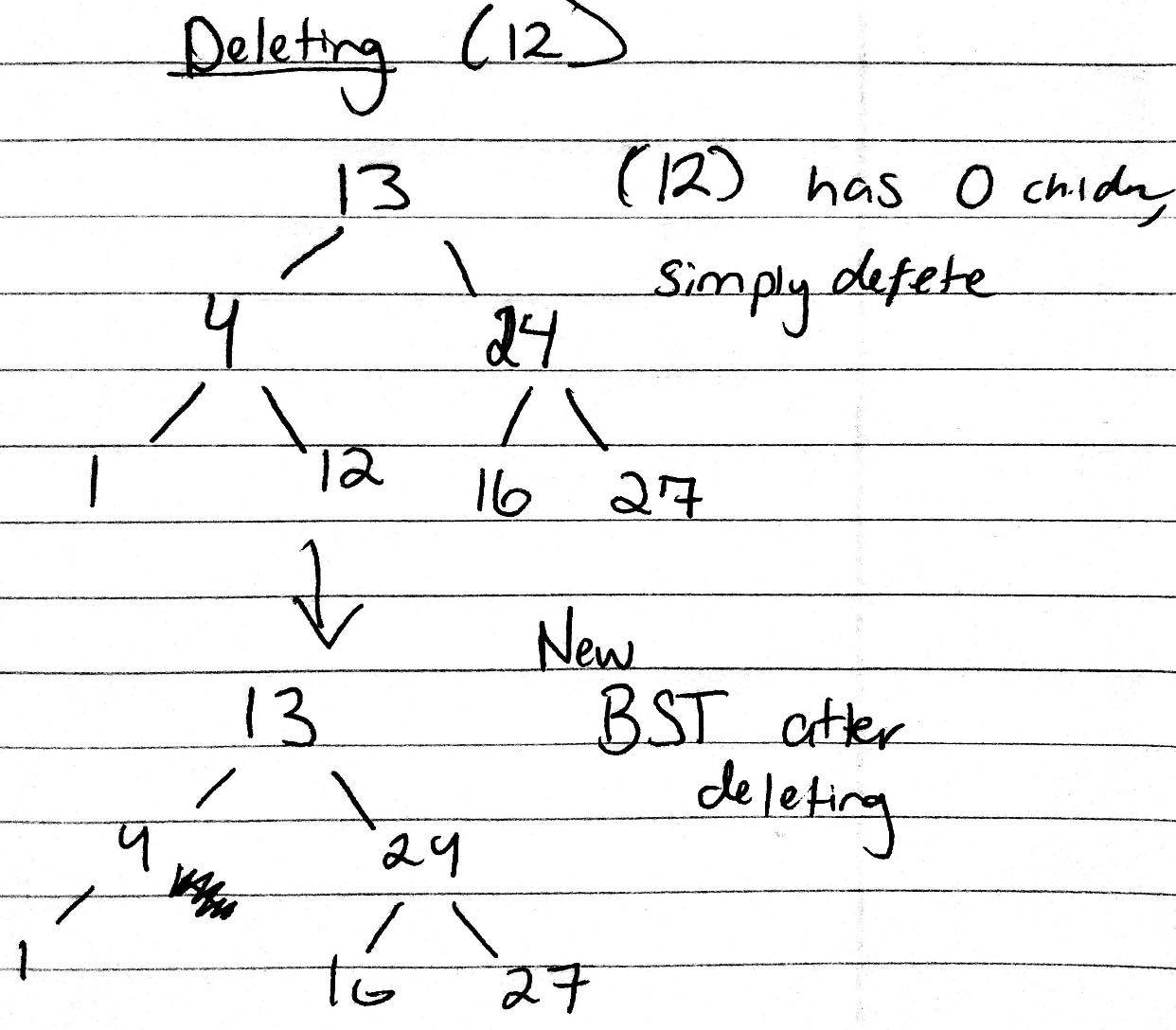
If the node has 0 children
In this case, you simply delete the node from the BST
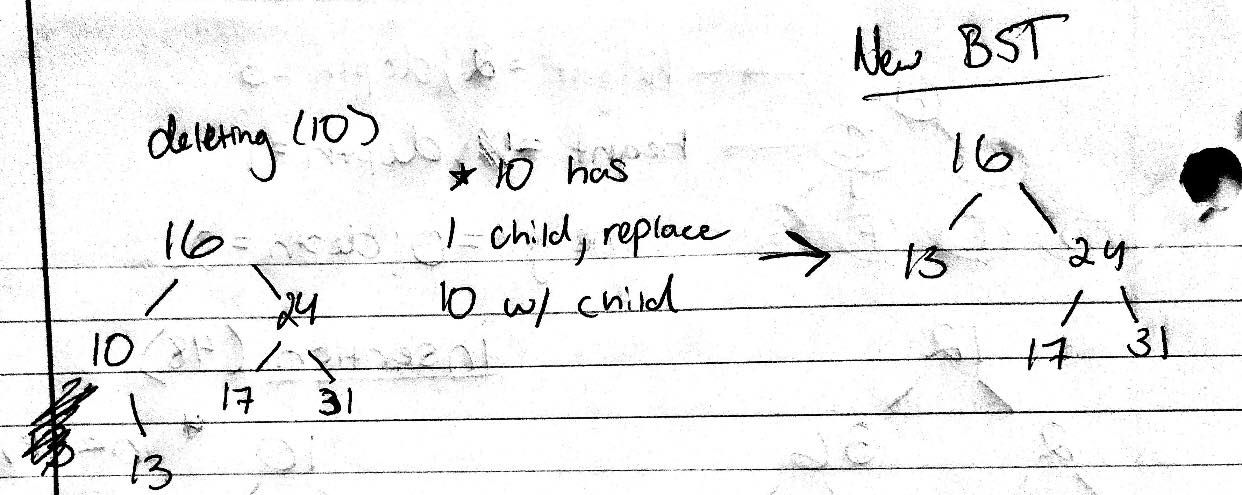
If the node has 1 child
In this case, you replace the node to delete with the child
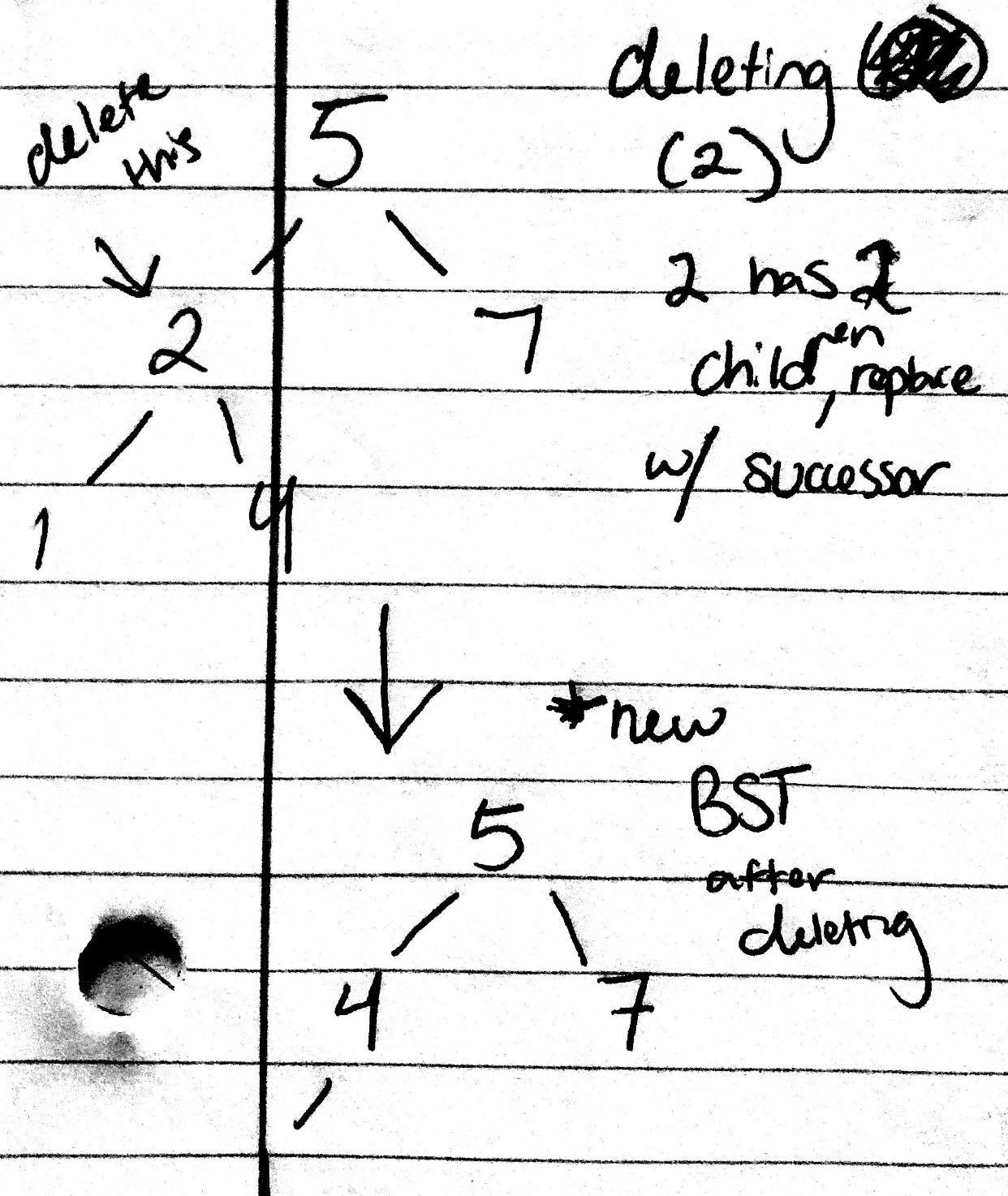
If the node has 2 children
In this case, you must replace the node with either the predecessor or successor
A predecessor is the maximum value in the node’s left subtree
A successor is the minimum value in the node’s right subtree
Deleting from BST, if the node to delete has 0 children.
Deleting from BST, if the node to delete has 1 child.
Deleting from BST, if the node to delete has 2 children.
Good job! You have now mastered one fundamental aspect within Computer Science and are one step closer to being a programming genius!!!
Citations:
Binary Trees. (2009). Retrieved from https://www.cs.cmu.edu/~adamchik/15-121/lectures/Trees/trees.html